
CSD Customers should have registered in afd.csdindia.gov.in for purchasing AFD Items!
[lwptoc numeration=”none” toggle=”0″ hideItems=”1″ width=”full” titleFontSize=”18px” itemsFontSize=”18px” backgroundColor=”#ffffff” borderColor=”” titleColor=”” linkColor=”#dd3333″ skipHeadingLevel=”h1,h2,h4,h5,h6″]
CSD AFD Login Page
How to register and login in the CSD’s official portal of afd.csdindia.gov.in
Due to heavy traffic (more than 45 lakh CSD smart cardholders), the official portal is hanging most of the time since yesterday (8.1.2021).
Better to try in night hours or early morning time for registration in the portal. The website faces many difficulties as it takes at least 15 minutes for a customer to register his name.
CSD AFD Canteen Registration
Documents for AFD CSD Registration:
- Canteen Smartcard (Grocery)
- Pan Card
- Mobile Phone for OTP verification
 >
>
CSD AFD Application Form
Details to be entered in the CSD AFD Online Application Form
- Name on the card
- Card ID Number with 19 Digit
- Chip Number with 16 Digit
- Mobile Number
- Employment Status
Select in Dropdown ↓
- Servicemen
- ESM
- Serving Defence Civilians
- On Deputation
Select in Dropdown ↓
- Army
- Air Force
- Navy Assam Rifles
- Coast Guard
- GREF
- Other Uniformed Organisations
- Defence Civilians
Other Details ↓
- Date of Birth
- Date of Enrollment
- Date of Retirement
- Entitlement Category
- PPO/Discharge No. (ESM)
- PAN Number
- Username
- Password
- Confirm Password
1. What is Chip number of the CSD Grocery Card?
- The chip number is unique for every Grocery card. The number is printed on the back of the canteen card or printed on your grocery bill.
2. What is the CSD Grocery Card ID number?
- The Grocery Canteen Card ID Number with 19 digits Alphanumeric number printed in your Grocery card.
afd.csdindia.gov.in Registration and Login Process – Online portal for CSD Customers
- A new domain afd.csdindia.gov.in for purchasing of AFD items introduced by the Canteen Stores Department (CSD) on 8 January 2021
- The Department of Stores Department under the Ministry of Defence has launched its online portal for shopping for Armed Forces Personnel and Ex-Servicemen. All CSD smartcard holders can buy AFD products through online without roaming here and there.
- The total process of purchasing a car, bike and home appliances has been changed and simplified. In the pandemic period of Covid-19, the step has welcomed by all. Paperless procedure and social distance also maintained in the new method of purchasing Washing Machine, Air Conditioner and Refrigerator thorough this portal.
afd.csdindia.gov.in – Online CSD Canteen Registration
All CSD Customers have to register before purchase AFD items through this portal is mandatory. The registration process is simple with a few steps. Here we explained a step and step pictorial guide to help you register and login for the first time. After successful registration only you can log in in the portal and continue your online shopping.
1st Step – Go to CSD’s official website of afd.csdindia.gov.in
2nd Step – Click on ‘Shop Now‘ button to start the registration on the home page.
3rd Step – Click on the “Click Here for New Registration” link is given bottom of the page.
You will be directed to the new registration page. Now, you have to keep some documents or details with you.
What are the documents need for registration in afd.csdindia.gov.in?
- Grocery Canteen Card
- Pan card
- Mobile Phone for OTP verification
What are the details asked for registration in afd.csdindia.gov.in?
- Grocery Canteen Card Chip Number(16 digits)
- Grocery Canteen Card ID Number (19 digits)
- Employment Status
- Organization
- Date of Birth
- Date of Joining
- Date of Retirement
- Entitlement Category
- PPO or Discharge No. (ESM)
- PAN Number
- User name
- Emai Id
- Password
4th Step – Enter your mobile number and click on ‘Send OTP’. You will get an OTP. Enter the OTP in the required box.
5th Step – After entering all details of your Name, Grocery Card ID, Grocery Chip number, Employment Status, Organisation, Date of birth, Date of Joining, PAN number etc, Click the button ‘Submit’.
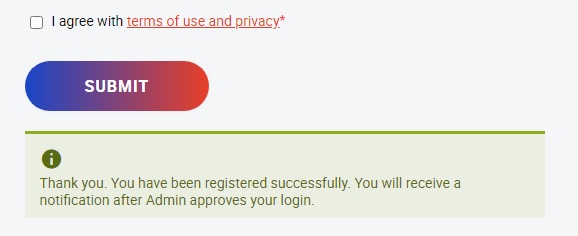
After successful entry of your all particulars, the system will show as below.
‘Thank You. You have been registered successfully. You will receive a notification after Admin approves your login’.
CSD AFD FAQ
Frequently Asked Questions about CSD AFD Online Registration Approval:
1. How often can CSD Customers purchase other AFD items?
CSD Customers can purchase other AFD items once every 4 years.
2. Do I need to meet any minimum service requirement to purchase other AFD-I items?
No, all canteen smart card holders, regardless of their service period, are eligible to purchase other AFD items.
3. Who is authorized to purchase other AFD items such as Two Wheelers, Refrigerators, Washing Machines, Televisions, and Air Conditioners?
The following categories of canteen Smartcard Holders are authorized to purchase other AFD items:
– Armed Forces personnel
– Retired Armed Forces personnel
– Defence Civilian Employees
4. Why can’t I pay through the Payment Gateway or Online Payment when choosing a loan?
For loans, the only accepted payment method is direct transfer, as the payment gateway only accepts full fees.
5. Can I modify the pre-filled details in the checkout form?
No, all details are automatically filled from the registration form submitted during the registration process. For further inquiries, please contact the helpdesk.
6. Can I purchase a second car from AFD within 5 years of buying the first car if I transfer the first car to a family member?
No, the car cannot be transferred until 5 years have passed since its purchase.
7. When am I eligible to purchase the same category product again?
You can only purchase a product of the same kind once within a specified period.
Note: For more information, please reach out to the CSD Directorate.
Leave a Reply